Architecture
There are three main components in play:
The browser.
Plone server, providing two views: the user-facing
@@collabora-editview, and the Collabora callback API@@collabora-wopi.Collabora Online server.
Collabora needs to be accessible from the browser. Plone needs to be not only accessible from the browser, but also from Collabora.
Information flow diagram
The following diagram illustrates the information flow.
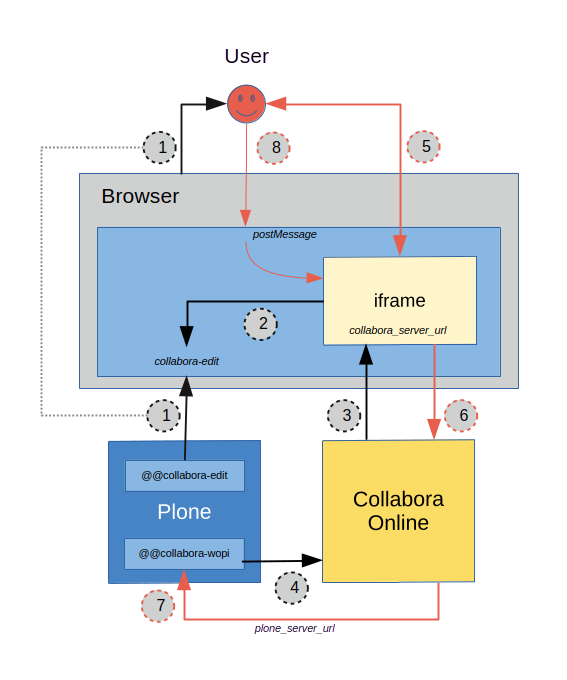
Opening a file for read access
Open the Plone view
@@collabora-edit. This is integrated in the Plone UI as an action calledOpen.The
collabora-editview renders with an iframe.The iframe loads the Collabora Online UI. The URL for that iframe contains the callback URL
collabora-wopithat Collabora will use to communicate with Plone in steps (4) and (7).Collabora retrieves the file to be edited directly from Plone, outside of the browser, by accessing the WOPI URL
@@collabora-wopi. It uses a JWT access token encoded in the iframe URL to connect to Plone as the user that has openedcollabora-edit.
The file is now rendered in the iframe in the browser. If the user has View
permissions, but not Modify portal content, the flow ends here. The user can
read the document and any comments other collaborators made on the document in
Collabora.
Editing a file and saving changes
If the user opening the document has
Modify portal contentpermission on the file, a real-time editing session is opened.Any changes the user makes to the document, will be autosaved.
The save is performed by Collabora issuing a POST request to the Plone view
@@collabora-wopi. That view checks permissions, and performs the save. In case of a write/locking conflict, that’s communicated back to Collabora which will open a UI for the user to resolve this.Some actions, like
Save and exit, can be performed on thecollabora-editview outside of the iframe. The Plone document communicates such actions to the Collabora iframe via the postMessage API, see: https://sdk.collaboraonline.com/docs/postmessage_api.html
Note that Collabora will issue a PUT request to save the file, once the last user leaves a collaborative editing session on a document. Even if a user makes changes and then directly kills their browser window, the document will be saved.